

Authored by Harry Wan, Head of Security, and Sam Wan, Lead AI Agent Developer
Threat Modeling the Emergency Termination Agent
We started with a simple question: what could go wrong with an agent that can shut down identities? The Britive Emergency Termination Agent runs in Gemini Enterprise and lets a security team contain a compromised human or non-human identity from one natural-language request. It cuts the time to containment, but the same power makes it a high-value target.
The agent's workflow defines its attack surface. In one guided flow, it:
- Confirms which identity is compromised, by an exact email, username or identity name.
- Lists every active session Britive brokers for that identity, with its recent audit activity.
- Waits for the responder to confirm with a one-time code, and for a Britive approver as well if the escalation profile requires approval.
- Disables the identity in Britive, so it can't sign in or check out access again.
- Checks in every active session, ending the access Britive brokered.
- Gathers audit context for the incident report, which can also be filed as a Jira ticket.
Each step touches a privileged system, a credential, or a human decision. We walked that flow with STRIDE, a standard threat modeling method, and six threats stood out.
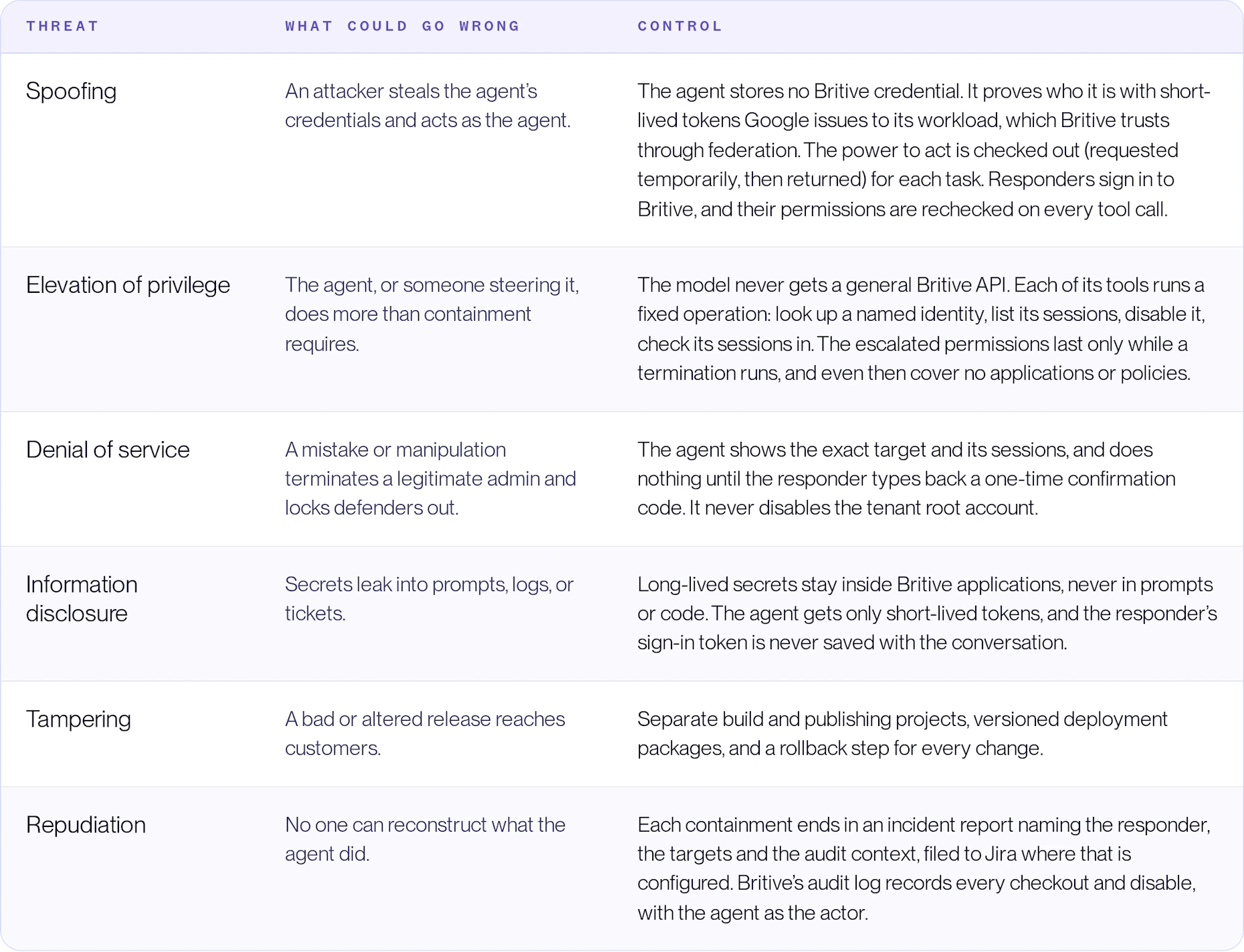
The model also surfaced a risk our controls reduce but don’t eliminate: prompt injection. The agent reads data such as session details and audit records, and text planted there could try to steer it.
Our first defense came in the requirements stage. We deliberately scoped the agent to a minimal set of tasks, so a manipulated agent has very little it could misuse. The model can only call the agent's own tools, and each runs a fixed Britive operation. Nothing is terminated until the responder types back a confirmation code, and that code has to appear in the responder's own message, so text planted in the data can't confirm on their behalf.
For example, the model has no way to list users. The agent's standing access can read the directory, but the only lookup tool the model is given takes one named identity and returns only an exact match, or at most five near misses when nothing matches. An attacker steering it couldn't pull a list of accounts. They would have to know which accounts to target already.
The worst case would be disruptive: steered into staging the wrong accounts, the agent could disable them if the responder confirmed without reading. A disabled account can be re-enabled, and the tenant root account is never disabled. The agent has no tool that grants access, edits applications or changes policies, so the profiles that govern access to AWS and other clouds stay untouched. Even so, this area needs continuous adversarial testing.
Checking Our Work Against ISACA
With the threats mapped, we compared our controls with ISACA's new white paper, Cybersecurity Recommendations for Securing AI Agents. Published on 15 September 2026, it sorts its guidance into 11 practice categories and ends with a 15-item secure-by-default checklist.
In April 2026, an AI agent deleted an organization's entire production database, a stark reminder of what privileged access can do in the wrong hands, human or machine. Our agent can end privileged sessions and disable identities, so if any agent should meet ISACA's bar, it's this one.
The sections below walk through each control and the ISACA guidance it answers.
Just-in-time Access, Not Standing Credentials
The agent is designed to hold as little standing access as possible, which answers ISACA's identity controls head-on. The white paper calls for a separate identity per agent, no shared accounts or long-lived tokens, short-lived credentials, least privilege, and just-in-time elevation for sensitive functions.
Take incident filing. Where a customer turns it on, the agent opens a Jira ticket at the end of every containment, but we didn’t want a static API token sitting inside it. Instead, it checks out access through Britive only when it needs it:
- A dedicated service account represents the agent in Jira, separate from any human user.
- At checkout, Britive mints an OAuth token that expires after one hour.
- Britive adds the service account to a project role in the incident space for that checkout only, then removes it at check-in.
- In that space, only the role can browse, create issues, add comments and attach files. Browsing is the gate: without it, the account can't see anything in the space at all.
Between incidents, the agent has no Jira access at all. If someone compromised it on a quiet day, there would be no Jira credential to steal.
The same rule governs the agent's Britive access. Between incidents it holds only Britive's built-in read-only auditor role, which is also where the audit context for each incident comes from. To terminate, it checks out an escalation profile for the few seconds the work takes. That grants two permissions, identity.user.manage and profiles.checkout.manage, and is checked back in when the work is done. Neither covers applications or policies. identity.user.manage is broad, though: it is how Britive manages users, tag membership included. So the final narrowing is in the agent's code, whose tools only ever disable identities and end their sessions.
The agent's one standing secret? There isn't one. The agent proves who it is with short-lived tokens Google issues to its workload, and Britive trusts them through federation, so there is no Britive token to store, rotate or steal.
The long-lived credentials that do exist sit inside Britive applications, where the agent never sees them: the API token the escalation application uses to grant the agent its role, which lasts at most 90 days, and, with Jira filing, the Atlassian client credentials. The Marketplace VM edition also needs a tenant-admin token once, to run its installer. It reads that token from Secret Manager in the customer’s project and destroys every version of the secret once the install succeeds.
A Human Approves the Irreversible Step
Nothing is disabled or revoked until a human says yes. ISACA asks for human approval on destructive, financial, legal, regulated, or irreversible actions. It also asks that people see a clear summary of exactly what an agent is about to do.
The agent’s flow is built around that moment. It first confirms which identity it’s dealing with, then lists every active session Britive brokers for it. Only after the responder reviews that list and types back a one-time confirmation code does it act. Where the escalation profile requires approval, a Britive approver must approve too, and the request they see names who is being cut off and who asked.
That ordering matters in an incident. Under pressure, the most likely mistake is acting on the wrong identity. Showing the target and its sessions before acting gives the responder a last chance to catch it.
Secrets Stay Out of the Agent
Secrets stay out of prompts and code. ISACA says secrets never belong in prompts and should live in a secrets manager behind scoped tokens.
In our design, long-lived credentials live only inside the Britive applications that broker each checkout: the Jira OAuth client secrets, and the API token the escalation application uses to grant the agent its role. The agent receives a short-lived token for one job and nothing more.
The agent also runs where the customer controls it. It deploys into the customer's own Google Cloud project on Vertex AI Agent Runtime and registers with their Gemini Enterprise. Britive trusts the agent through that project's own workload identity, so the credential it relies on never leaves the customer's boundary.
Every Change Has a Way Back
Each production change to the agent's delivery pipeline goes through a change record with its own rollback step. ISACA calls for formal change management, version history, and the ability to roll back everything from models to configurations.
We follow the same discipline we'd expect of any production system:
- The deployment image is built in a separate development project, then published from a separate production project.
- Storage for deployment packages has versioning turned on, so any earlier package can be restored.
None of this is exotic. That's the point: ISACA's view is that agents need proven security practice, adapted for new risks, not a separate rulebook.
A Kill Switch for Other Agents
The Emergency Termination Agent doesn't just follow ISACA's guidance; it helps customers meet it. Two of ISACA's 11 categories focus on what happens when things go wrong: incident response, and resilience with kill switches.
ISACA argues that fast containment shrinks the blast radius of a failure or attack. It calls for defined containment procedures and the ability to shut down unsafe agent behavior quickly.
Because our agent works on non-human identities as well as people, it can contain a misbehaving AI agent the same way it contains a compromised employee account. It finds the agent’s live sessions, disables its identity once the responder confirms, ends those sessions, and documents what happened. For teams deploying agents at scale, that is a containment playbook they can start with a single request.
A Practice, Not a Project
ISACA is clear that securing an agent is never finished. Controls need review and retesting whenever models, tools, data sources, or workflows change. The same goes for the threat model: every new tool, permission, or data source the agent gains is a reason to walk through it again.
We agree, and we don't claim this agent checks every box. The areas above are where its design is strongest. The rest of ISACA's checklist, including continuous red-teaming for prompt injection and tool misuse, is how we'll keep measuring it.
The broader lesson is simple. An agent powerful enough to shut down identities has to be held to the same standard it enforces: minimal standing access, a human on the irreversible step, and a clear way back.