

Back to resources
Britive Emergency Termination Agent: Built on Gemini Enterprise
October 2026 / 8 min. read /
By Sam Wan, Lead AI Agent Developer, Britive
How We Built the Britive Emergency Termination Agent
If you’ve ever been on an incident call, you know that deciding to cut off a compromised identity is usually the easy part. The decision might take seconds. What comes next can take considerably longer.
Someone must figure out where that identity still has access, find every active session, terminate those sessions in the right systems, disable the account, and document what happened. During an incident, that’s exactly the kind of repetitive work you want to happen quickly and consistently.
That’s what we built the Britive Emergency Termination Agent to do.
The agent runs on Gemini Enterprise and handles the mechanics of containment, but we made an important design decision from the beginning: a person still makes the decision to act. The agent can investigate, assemble the context, and carry out the response, but it doesn’t get to decide on its own that someone should lose access.
From detection to containment in one governed flow
Here's what that looks like in practice, and some of the thinking behind how we built it.
What happens when an identity is compromised
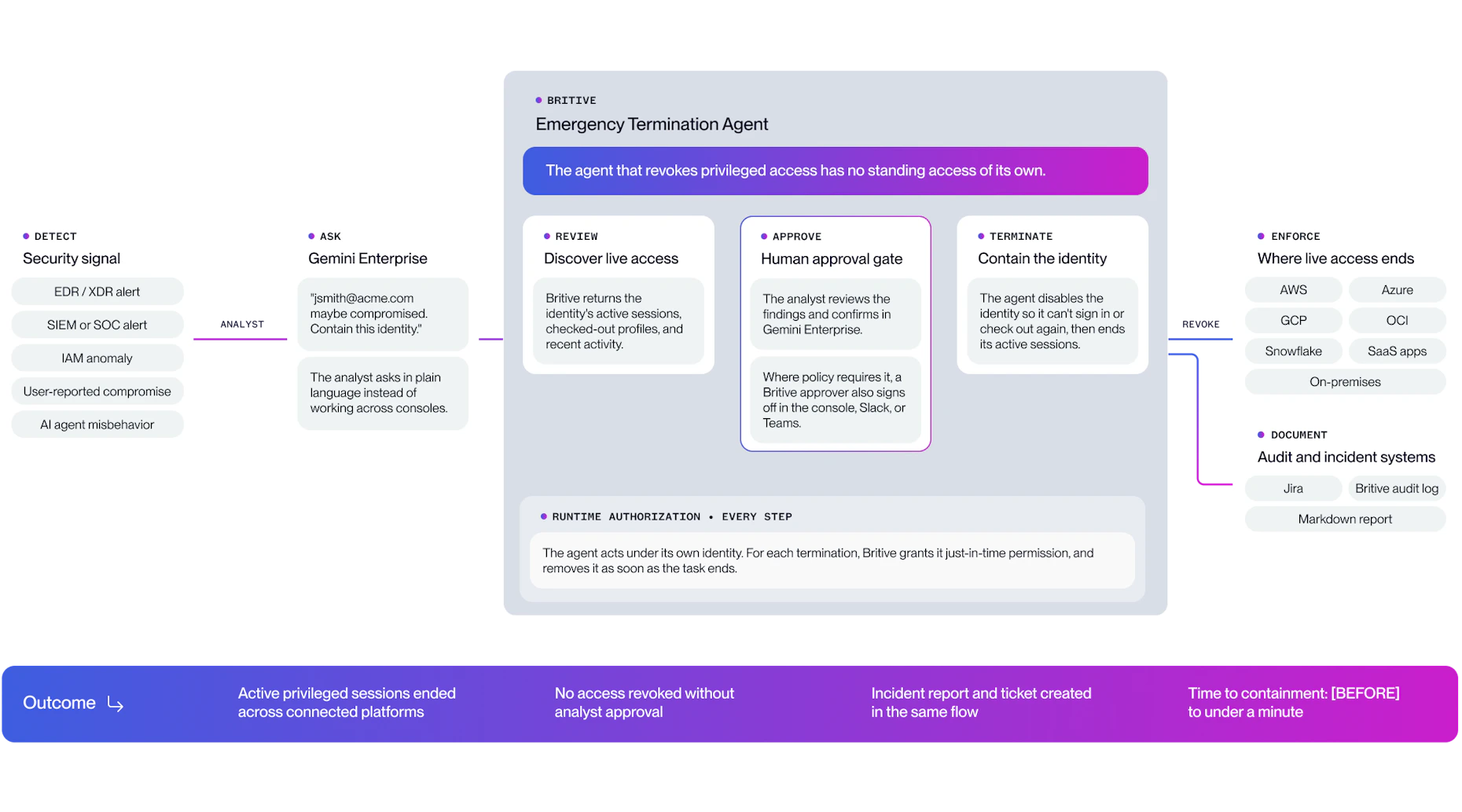
A responder opens the agent in Gemini Enterprise and signs in with their Britive account and can ask a straightforward question such as, “jsmith@acme.com may be compromised. What does he have?”
The agent looks up the identity in Britive and returns the active sessions and checked-out profiles Britive manages for that identity, along with recent audit history. In our demo environment, for example, the identity had an Azure role, a BigQuery profile, and a Snowflake security manager profile checked out and active.
At this point, the agent has gathered information, but it hasn’t changed anything. It asks the responder whether they want to terminate the sessions and disable the identity. The responder has to confirm the action with a one-time code, and if the escalation profile requires another approver, that approval happens in the Britive console, Slack, or Microsoft Teams.
Only then does containment begin.
There’s a small implementation detail here that matters more than it might seem. We disable the identity before terminating its sessions. Doing it in the opposite order creates a window where the identity could potentially establish another session before it is disabled. Closing the identity first removes that opportunity, and then the agent can clean up whatever sessions remain.
When the work is finished, the agent creates a Jira ticket containing the incident context, records the containment in the Britive audit log, and produces a Markdown report for the responder.
The workflow is intentionally simple: investigate, confirm, contain, document.
How the agent avoids holding standing admin access
This was one of the more interesting design problems.
An agent capable of disabling identities and terminating sessions is itself powerful. Giving it permanent administrative privileges would have made implementation easier, but it also would have created exactly the kind of standing privilege we’re trying to eliminate.
So we didn’t.
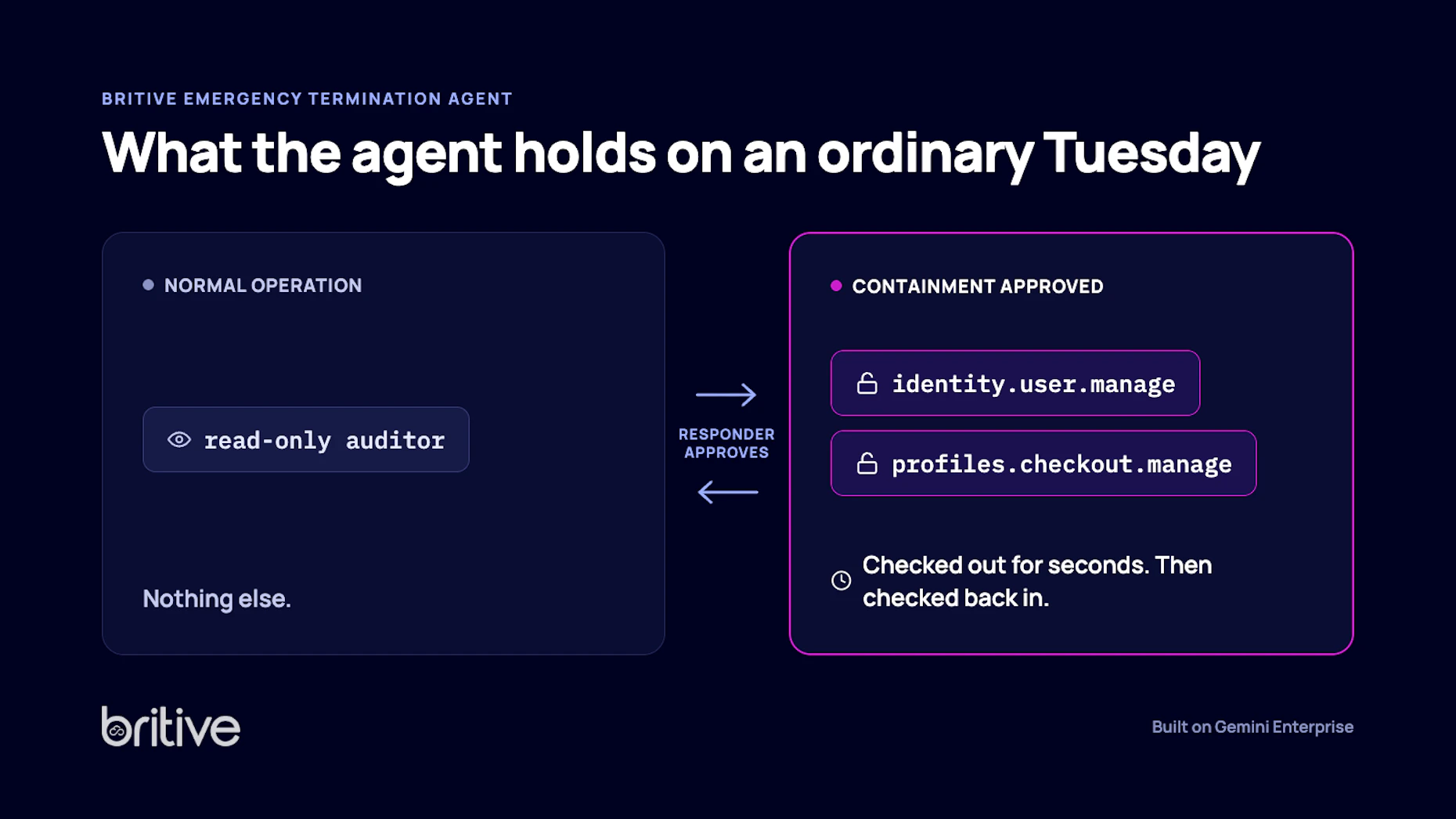
During normal operation, the agent has only a read-only auditor role in Britive. That gives it enough access to investigate an identity and understand its active sessions, but not enough to disable identities or terminate access.
Those additional permissions exist only when they’re needed.
When a responder approves containment, the agent checks out an escalation profile containing two permissions: identity.user.manage and profiles.checkout.manage. It uses them for the few seconds required to perform the containment and then checks them back in.
We use the same principle for Jira. The agent has a dedicated service account, but the access required to perform its work is provisioned at checkout. Britive issues an OAuth token that expires after one hour, adds the account to the project roles it needs, and removes that access by checking in the Jira profile.
That gives us a useful test of the architecture: look at the agent on an ordinary Tuesday when nothing is happening. You’ll find a read-only role and little else. The powerful permissions appear when the work requires them and disappear when the work is finished.
How the agent authenticates without stored credentials
We also wanted to avoid solving the standing-privilege problem while quietly introducing a standing-credential problem.
The agent runs inside the customer’s own Google Cloud project and doesn’t store a Britive credential. Instead, Google issues short-lived tokens to the agent’s workload, which Britive accepts through identity federation. There isn’t a Britive API key sitting in a configuration file waiting for someone to find it.
There are still a few long-lived secrets required by the surrounding system, including the Jira OAuth client secret and the API token used by the escalation application. Those are stored in Britive’s secrets management rather than exposed to the agent.
Installation has its own bootstrap problem. The installer temporarily reads a tenant admin token from Google Secret Manager during setup, but that token is destroyed when installation is complete. We wanted the installation process to leave behind as little permanent privileged material as possible.
Why the agent can only perform five actions
One temptation when building an agent is to keep giving it more tools. We went in the opposite direction.
The Emergency Termination Agent has a small set of tools, each corresponding to a specific operation it needs to perform: look up an identity, inspect its sessions, disable it, terminate its sessions, and create the incident ticket.
That’s basically it.
There is no tool for granting access, editing applications, changing policies, or even broadly listing users. The agent also can’t invent a new operation outside the tools we’ve explicitly given it.
That limitation is a security control.
If someone finds a way to influence the model, the question becomes, “What can the model actually do?” A smaller set of narrowly defined tools gives an attacker far less to work with.
Prompt injection was one of the risks we paid particular attention to because the agent consumes session information and audit records as text. An attacker could potentially place malicious instructions inside data the agent later reads.
That’s one reason the confirmation mechanism matters. The one-time code used to approve containment must appear in the responder’s own message. If the same code somehow appears inside an audit record or other data being processed by the agent, it doesn’t count as authorization.
We also considered the less exotic failure case: what happens if a legitimate responder simply approves the wrong action? The agent could disable the wrong identity. That’s obviously something we want to prevent, but we also designed for recovery. The tenant root account is protected, and a disabled account can be re-enabled.
Security here isn’t about pretending mistakes are impossible. It’s about limiting what can happen and making mistakes recoverable.
Why the agent never does more than the responder could
There’s another separation we wanted to preserve.
Gemini Enterprise determines who can see and talk to the Emergency Termination Agent. Britive determines two separate things: whether this responder may terminate access, and what access the agent itself can obtain.
Each responder signs in to Britive. Before the agent looks anything up or changes anything, it checks that the responder already holds the two permissions a termination needs: disabling identities and checking in other identities’ sessions. If they don’t, the agent refuses and tells them a Britive admin must grant them. The agent never acts with more authority than the person asking.
That doesn’t make the responder a full Britive administrator. A Britive admin can give responders a role with just those two permissions. Nor does the responder need administrative access to Azure, Snowflake, or any other system the compromised identity reached, because Britive brokers those sessions and ends them centrally.
What the agent takes off the responder is the mechanics: finding every session, acting in the right order, and documenting it all, under pressure, during an incident.
How the design maps to ISACA’s AI agent security recommendations
Around the time we were building the agent, ISACA published its Cybersecurity Recommendations for Securing AI Agents. We used the recommendations as another way to pressure-test some of our design decisions.
The architecture reflects several of its core principles: just-in-time access instead of standing administrative credentials, human confirmation around consequential actions, keeping long-lived secrets out of prompts and application code, and shipping changes through a controlled process with versioned packages and documented rollback.
We’ve gone deeper into the individual threats and mitigations in our STRIDE threat model: Securing AI Agents: A STRIDE Threat Model.
What was useful about doing this exercise wasn’t checking boxes against a framework. It forced us to ask whether we were holding the agent itself to the same security principles we expect it to enforce.
Containing a compromised AI agent the same way
One of the reasons we built the workflow around identities rather than around employees is that compromised access isn’t exclusively a human problem.
Britive manages AI agents, non-human identities, and people, and the Emergency Termination Agent can disable both human and non-human identities. So when the identity behaving unexpectedly is an AI agent rather than a person, the responder doesn’t need a separate process. They investigate the identity, see its active access, approve containment, and remove that access through the same controlled workflow.
That matters more as AI agents take actions across cloud, SaaS, data, and infrastructure environments.
What you need to run the agent
The current implementation uses a Britive tenant, Gemini Enterprise, and a Google Cloud project in which the agent runs. Jira is optional and used for incident ticketing in the workflow described above. Every run also produces a Markdown report that can be attached to any ticketing system.
To learn more, read Google Cloud’s announcement or contact your Britive team to get started.
How we keep testing the agent’s security
We don’t consider the security design finished simply because the agent works today.
Models change. Tools change. The information an agent consumes changes. Each of those can alter the threat model, which means the controls need to be tested again as the system evolves.
That may be the most important lesson from building this agent. An AI agent capable of terminating privileged access shouldn’t itself depend on standing privilege, standing credentials, or unchecked authority.
It should have what it needs to do the job, when it needs it, with a person making the consequential decision.
That’s the standard we designed the Emergency Termination Agent around, and it’s the standard we’ll keep testing it against.